Rust: simple actix-web email-password login and request authentication using middleware.
For our learning actix-web application, we are now adding two new features. ⓵ A simple email-password login with no session expiry. ⓶ A new middleware that manages request authentication using an access token “generated” by the login process. All five existing routes are now protected by this middleware: they can only be accessed if the request has a valid access token. With these two new features added, this application acts as both an application server and an API-like server or a service.
🦀 Index of the Complete Series.
 |
|---|
| Rust: simple actix-web email-password login and request authentication using middleware. |
🚀 Please note, complete code for this post can be downloaded from GitHub with:
git clone -b v0.6.0 https://github.com/behai-nguyen/rust_web_01.git
The actix-web learning application mentioned above has been discussed in the following five previous posts:
- Rust web application: MySQL server, sqlx, actix-web and tera.
- Rust: learning actix-web middleware 01.
- Rust: retrofit integration tests to an existing actix-web application.
- Rust: adding actix-session and actix-identity to an existing actix-web application.
- Rust: actix-web endpoints which accept both
application/x-www-form-urlencodedandapplication/jsoncontent types.
The code we’re developing in this post is a continuation of the code from the fifth post above. 🚀 To get the code of this fifth post, please use the following command:
git clone -b v0.5.0 https://github.com/behai-nguyen/rust_web_01.git
– Note the tag v0.5.0.
Table of contents
- Some Terms and Phrases Definition
- Project Layout
- Code Documentation
- Issues Covered In This Post
- On the Hard-Coded Value for
employees.password - Notes On Cookies
- HTTP Response Status Code
- How the Email-Password Login Process Works
- How the Request Authentication Process Works
- The Home Page and the Logout Routes
- Integration Tests
- Some Manual Tests
- Rust Users Forum Helps
- Some Current Issues
- Concluding Remarks
Some Terms and Phrases Definition
Let’s clarify the meanings of some glossary terms to facilitate the understanding of this post.
● An application server – the application functions as
a website server, serving interactive HTML pages and managing
states associated with client web sessions.
● An API-like server or a service – the application
operates as a data provider, verifying the validity of client requests.
Specifically, it checks for a valid access token
included in the request authorization header. If the requests are valid,
it proceeds to serve them.
● An access token – in this revision of the code,
any non-blank string is considered a valid access token!
Please note that this is a work in progress, and currently, login emails are
used as access tokens.
As such, we acknowledge that this so-called
access token
is relatively ineffective as a security measure.
The primary focus of this post is on the login and
request authentication
processes. Consider it a placeholder, as we plan to refactor it into a
more formal authentication method.
The response from the login process always includes the access token
in the authorization header implictly, and explictly in JSON responses.
Clients should store this access token for future use.
To utilise this application as an API-like
server or a service, client requests must include the
previously provided access token
in the authorization header.
● An authenticated session – a client web session who has previously
logged in or authenticated. That is, having been given an
access token by the login process.
● Request authentication – the process of verifying that the
access token is present and valid.
If a request passes the request authentication
process, it indicates that the request comes from an
authenticated session.
● Request authentication middleware – this is the new
middleware mentioned in the introduction, fully responsible for the
request authentication process.
● An authenticated request – a request which has passed the
request authentication process.
Project Layout
This post introduces several new modules and a new HTML home page, with some modules receiving updates. The updated directory layout for the project is listed below.
– Please note, those marked with ★ are updated, and those marked with ☆ are new.
.
├── Cargo.toml ★
├── .env
├── migrations
│ ├── mysql
│ │ └── migrations
│ │     ├── 20231128234321_emp_email_pwd.down.sql
│ │     └── 20231128234321_emp_email_pwd.up.sql
│ └── postgres
│     └── migrations
│         ├── 20231130023147_emp_email_pwd.down.sql
│         └── 20231130023147_emp_email_pwd.up.sql
├── README.md ★
├── src
│ ├── auth_handlers.rs ★
│ ├── auth_middleware.rs ☆
│ ├── bh_libs
│ │ └── api_status.rs ★
│ ├── bh_libs.rs ★
│ ├── config.rs
│ ├── database.rs
│ ├── handlers.rs
│ ├── helper
│ │ ├── app_utils.rs ☆
│ │ ├── constants.rs ☆
│ │ ├── endpoint.rs ★
│ │ └── messages.rs ★
│ ├── helper.rs ★
│ ├── lib.rs ★
│ ├── main.rs
│ ├── middleware.rs
│ ├── models.rs ★
│ └── utils.rs
├── templates
│ ├── auth
│ │ ├── home.html ☆
│ │ └── login.html
│ └── employees.html ★
└── tests
    ├── common.rs ★
    ├── test_auth_handlers.rs ☆
    └── test_handlers.rs ★
Code Documentation
The code has extensive documentation. It probably has more detail than in this post, as documentation is specific to functionalities and implementation.
To view the code documentation, change to the project directory (where
Cargo.toml is located) and run the following command:
▶️Windows 10: cargo doc --open
▶️Ubuntu 22.10: $ cargo doc --open
Issues Covered In This Post
❶ “Complete” the login function.
In the fifth
post, we introduced two new login-related routes, /ui/login and
/api/login, used them to demonstrate accepting request data in both
application/x-www-form-urlencoded and application/json formats.
In this post, we’ll fully implement a simple email and password login process with no session expiry. In other words, if we can identify an employee by email, and the submitted password matches the database password, then the session is considered logged in or authenticated. The session remains valid indefinitely, until the browser is shut down.
🚀 The handlers for /ui/login and /api/login
have the capability of conditionally return either HTML or JSON depending
on the content type of the original request.
❷ Protect all existing and new /data/xxx and /ui/xxx routes
(except /ui/login) using the new
request authentication middleware as mentioned in the introduction.
This means only
authenticated requests can access these routes.
Recall that we have the following five routes, which query the
database and return data in some form:
-
JSON response route
http://0.0.0.0:5000/data/employees-- method:POST; content type:application/json; request body:{"last_name": "%chi", "first_name": "%ak"}. -
JSON response route
http://0.0.0.0:5000/data/employees/%chi/%ak-- methodGET. -
HTML response route
http://0.0.0.0:5000/ui/employees-- method:POST; content type:application/x-www-form-urlencoded; charset=UTF-8; request body:last_name=%chi&first_name=%ak. -
HTML response route
http://0.0.0.0:5000/ui/employees/%chi/%ak-- method:GET. -
HTML response route
http://0.0.0.0:5000/helloemployee/%chi/%ak-- method:GET.
We implement protection, or request authentication,
around these routes, allowing only
authenticated sessions to access them. When a request is not authenticated,
it gets redirected to the /ui/login route. The handler for this route
uses the content type of the original request to determine whether it returns
the HTML login page with a user-friendly error message or an appropriate JSON error response.
The new middleware we’re using to manage the
request authentication process is based on the
official redirect example.
We rename it to
src/auth_middleware.rs.
❸ We implement two additional authentication-related routes: /ui/home
and /api/logout.
The /ui/home route is protected, and if requests
are successful, its handler always returns the HTML home page.
The /api/logout handler always returns the HTML login
page.
To recap, we have the following four new authentication-related routes:
-
HTML/JSON response route
http://0.0.0.0:5000/ui/login-- method:GET. -
HTML/JSON response route
http://0.0.0.0:5000/api/login-- method:POST.
content type:application/x-www-form-urlencoded; charset=UTF-8; request body:email=chirstian.koblick.10004@gmail.com&password=password.
content type:application/json; request body:{"email": "chirstian.koblick.10004@gmail.com", "password": "password"}. -
HTML response route
http://0.0.0.0:5000/ui/home-- method:GET. -
HTML response route
http://0.0.0.0:5000/api/logout-- method:POST.
❹ Updating existing integration tests and creating new ones for new functionalities.
On the Hard-Coded Value for employees.password
In the section
Add new fields email and password to the employees table
of the
fifth
post, in the
migration script,
we hard-coded the string $argon2id$v=19$m=16,t=2,p=1$cTJhazRqRWRHR3NYbEJ2Zg$z7pMnKzV0eU5eJkdq+hycQ
for all passwords. It is the hashed version of password.
It was generated using Argon2 Online by Esse.Tools, which is compatible with the argon2 crate. Thus, we can use this crate to de-hash a hashed password to compare it to a plain text one.
Notes On Cookies
❶ In the fourth post, Rust: adding actix-session and actix-identity to an existing actix-web application, we introduced the crate actix-identity, which requires the crate actix-session. However we didn’t make use of them. Now, they are used in the code of this post.
The crate actix-session
will create a secured cookie named id.
However, since we’re only testing the application with HTTP (not
HTTPS), some browsers reject such secured cookie.
Since this is only a learning application, we’ll make all cookies non-secured. Module src/lib.rs gets updated as follows:
...
            .wrap(SessionMiddleware::builder(
                    redis_store.clone(),
                    secret_key.clone()
                )
                .cookie_secure(false)
                .build(),
            )
...
We call the
builder(…) method
to access the
cookie_secure(…) method
and set the cookie id to non-secured.
❷ To handle potential request redirections during the login and
the
request authentication
processes, the application utilises the following server-side
per-request cookies: redirect-message
and original-content-type.
💥 Request redirection occurs when a request is redirected
to /ui/login due to some failure condition. When a request
gets redirected elsewhere, request redirection does not apply.
These cookies help persisting necessary information between requests. Between requests refers to the original request that gets redirected, resulting in the second and final independent request. Hence, per-request pertains to the original request.
We implement a helper function to create these cookies in the module src/helper/app_utils.rs:
pub fn build_cookie<'a>(
...
    let mut cookie = Cookie::build(name, value)
        .domain(String::from(parts.collect::<Vec<&str>>()[0]))
        .path("/")
        .secure(false)
        .http_only(server_only)
        .same_site(SameSite::Strict)
        .finish();

    if removal {
        cookie.make_removal();
    }
...
Refer to the following Mdm Web Docs Set-Cookie for explanations of the settings used in the above function.
Take note of the call to the method make_removal(…) – it’s necessary to remove the server-side per-request cookies when the request completes.
In addition to the aforementioned temporary cookies, the application
also maintains an application-wide publicly available cookie named
authorization. This cookie stores the
access token
after a successful login.
To recap, the application maintains three cookies. In the module
src/helper/app_utils.rs,
we also implement three pairs of helper methods,
build_xxx_cookie(...) and remove_xxx_cookie(...),
to help manage the lifetime of these cookies.
HTTP Response Status Code
All HTTP responses – successful and failure, HTML and JSON –
have their HTTP response status code set to an appropriate
code. In addition, if a response is in JSON format, the
field
ApiStatus.code
also has its value sets to the value of the HTTP response status
code.
– We’ve introduced
ApiStatus in the
fifth
post. Basically, it’s a generic API status response that gets
included in all JSON responses.
We set the HTTP response status code base on “The OAuth 2.0 Authorization Framework”: https://datatracker.ietf.org/doc/html/rfc6749; sections Successful Response and Error Response.
How the Email-Password Login Process Works
👎 This is the area where I encountered the most difficulties while learning
actix-web
and actix-web middleware. Initially,
I thought both the login and the request authentication
processes should be in the same middleware. I attempted that approach, but it was unsuccessful.
Eventually, I realised that login should be handled by an endpoint handler function. And
request authentication should be managed
by the middleware. In this context, the middleware is much like a Python decorator.
The email-password login process exclusively occurs in module
src/auth_handlers.rs.
In broad terms, this process involves two routes /api/login and /ui/login.
❶ The login process, /api/login handler.
The login process handler is
pub async fn login(request: HttpRequest, app_state: web::Data<super::AppState>, .
It works as follows:
body: Bytes) -> Either<impl Responder, HttpResponse>
⓵ Attempt to extract the submitted log in information, a step discussed the
fifth
post above. If the extraction fails, it always returns a JSON response
of ApiStatus with a code
of 400 for BAD REQUEST. And that’s the end of the request.
⓶ Next, we use the submitted email to retrieve the target employee
from the database. If there is no match, we call the helper function
fn first_stage_login_error_response(request: &HttpRequest, message: &str) -> HttpResponse
to handle the failure:
● If the request content type is application/json,
we return a JSON response of
ApiStatus with a code
of 401 for UNAUTHORIZED. The value for the
message field is set to the value of the parameter message.
● For the application/x-www-form-urlencoded content type,
we set the server-side per-request cookie redirect-message
and redirect to route /ui/login:
...
        HttpResponse::Ok()
            .status(StatusCode::SEE_OTHER)
            .append_header((header::LOCATION, "/ui/login"))
            // Note this per-request server-side only cookie.
            .cookie(build_login_redirect_cookie(&request, message))
            .finish()
...
We’ve previously described
redirect-message. In the following section,
we’ll cover the /ui/login handler.
● An appropriate failure response has been provided, and the request is completed.
⓷ An employee’s been found using an exact email match. The next step is to compare password.
The function
fn match_password_response(request: &HttpRequest,
handles password comparison. It uses the
argon2
crate to de-hash the database password and compare it to the submitted password.
We’ve briefly discussed this process in the section On the Hard-Coded Value for
submitted_login: &EmployeeLogin, selected_login: &EmployeeLogin) -> Result<(), HttpResponse>employees.password.
● If the passwords don’t match, similar to
step ⓶ above,
we call the function
fn first_stage_login_error_response(request: &HttpRequest, message: &str) -> HttpResponse
to return an appropriate HTTP response.
● The passwords don’t match. An appropriate failure response has been provided, and the request is completed.
⓸ Email-password login has been successful. Now, we’re back in the endpoint
handler for /api/login, pub async fn login(request: HttpRequest, app_state: web::Data<super::AppState>, .
body: Bytes) -> Either<impl Responder, HttpResponse>
...
    // TO_DO: Work in progress -- future implementations will formalise access token.
    let access_token = &selected_login.email;

    // https://docs.rs/actix-identity/latest/actix_identity/
    // Attach a verified user identity to the active session
    Identity::login(&request.extensions(), String::from(access_token)).unwrap();

    // The request content type is "application/x-www-form-urlencoded", returns the home page.
    if request.content_type() == ContentType::form_url_encoded().to_string() {
        Either::Right( HttpResponse::Ok()
            // Note this header.
            .append_header((header::AUTHORIZATION, String::from(access_token)))
            // Note this client-side cookie.
            .cookie(build_authorization_cookie(&request, access_token))
            .content_type(ContentType::html())
            .body(render_home_page(&request))
        )
    }
    else {
        // The request content type is "application/json", returns a JSON content of
        // LoginSuccessResponse.
        //
        // Token field is the access token which the users need to include in the future
        // requests to get authenticated and hence access to protected resources.
        Either::Right( HttpResponse::Ok()
            // Note this header.
            .append_header((header::AUTHORIZATION, String::from(access_token)))
            // Note this client-side cookie.
            .cookie(build_authorization_cookie(&request, access_token))
            .content_type(ContentType::json())
            .body(login_success_json_response(&selected_login.email, &access_token))
        )
    }
...
● The access_token
is a work in progress. The main focus of this post is on the login and the
request authentication
processes. Setting the access_token
to just the email is sufficient to get the entire process working, helping us understand
how everything comes together better. We’ll refactor this to a more formal type of
authentication later.
● The line Identity::login(&request.extensions(), String::from(access_token)).unwrap();
is taken directly from the actix-identity crate. I believe this
allows the application to operate as an application server.
● 🚀 Note that for all responses, the
access_token
is set in both the authorization header and the
authorization cookie. This is intended for clients usage,
for example, in JavaScript. Clients have the option to extract and store this
access_token
for later use.
● 💥 Take note of this authorization header. It is
only available to clients, for example, in JavaScript. The
request authentication middleware
also attempts to extract the
access_token
from this header,
as explained earlier.
This header is set explicitly by clients
when making requests. While, at this point, it is a response header,
and therefore, it will not be available again in later requests unless explicitly set.
And, finally:
● If the content type is application/x-www-form-urlencoded,
we return the HTML home page as is.
● If the content type is application/json,
we return a JSON serialisation of
LoginSuccessResponse.
❷ The login page, /ui/login handler.
The login page handler is
pub async fn login_page(request: HttpRequest) -> Either<impl Responder, HttpResponse>.
This route can be accessed in the following three ways:
⓵ Direct access from the browser address bar, the login page HTML gets served as is. This is a common use case. The request content type is blank.
⓶ Redirected to by the login process handler as
already discussed.
It should be apparent that when this handler is called,
the server-side per-request cookie redirect-message
has already been set. The presence of this cookie signifies that
this handler is called after a fail login attempt. The value
of the redirect-message cookie is included in the
final response, and the HTTP response code is set to 401
for UNAUTHORIZED.
In this scenario, the request content type is available throughout the call stack.
⓷ Redirected to by src/auth_middleware.rs. This middleware is discussed in its own section titled How the Request Authentication Process Works.
At this point, we need to understand that, within the middleware, the closure
redirect_to_route = |req: ServiceRequest, route: &str| -> Self::Future:
-
Always creates the server-side per-request
original-content-typecookie, with its value being the original request content type. -
If it redirects to
/ui/login, then creates the server-side per-requestredirect-messagecookie with a value set to the constantUNAUTHORISED_ACCESS_MSG.
⓸ Back to the login page handler
pub async fn login_page(request: HttpRequest) -> Either<impl Responder, HttpResponse>:
...
    let mut content_type: String = String::from(request.content_type());
    let mut status_code = StatusCode::OK;
    let mut message = String::from("");

    // Always checks for cookie REDIRECT_MESSAGE.
    if let Some(cookie) = request.cookie(REDIRECT_MESSAGE) {
        message = String::from(cookie.value());
        status_code = StatusCode::UNAUTHORIZED;

        if let Some(cookie) = request.cookie(ORIGINAL_CONTENT_TYPE) {
            if content_type.len() == 0 {
                content_type = String::from(cookie.value());
            }
        }
    }
...
From
section ⓶
and
section ⓷,
it should be clear that the presence of the
server-side per-request redirect-message cookie
indicates a redirect access. If the request content type is not
available, we attempt to retrieve it from the server-side per-request
original-content-type cookie.
Finally, it delivers the response based on the content type and removes
both the redirect-message and original-content-type
cookies. Note on the following code:
...
    else {
        Either::Left(
            ApiStatus::new(http_status_code(status_code)).set_message(&message)
        )
    }
...
We implement
Responder trait for ApiStatus as described in the
Response with custom type
section of the official documentation.
How the Request Authentication Process Works
Now, let’s delve into the discussion of the
request authentication middleware.
Recall the definition of
request authentication
The essential logic of this new middleware is to determine if a request is from an
authenticated session,
and then either pass the request through or redirect to an appropriate route.
This logic can be described by the following pseudocode:
Requests to “/favicon.ico” should proceed.

When Logged In
--------------

1. Requests to the routes “/ui/login” and “/api/login”
   are redirected to the route “/ui/home”.

2. Requests to any other routes should proceed.

When Not Logged In
------------------

1. Requests to the routes “/ui/login” and “/api/login”
   should proceed.

2. Requests to any other route are redirected to
   the route “/ui/login”.
This logic should cover all future routes. Since this middleware is registered last, it means that all existing routes and potential future routes are protected by this middleware.
A pair of helper functions discribed below is responsible for managing the
request authentication process.
The helper function
fn extract_access_token(request: &ServiceRequest) -> Option<String>
looks for the access token in:
-
The
authorizationheader, which is set explicitly by clients when making requests. - If it isn't in the header, we look for it in the identity managed by the actix-identity crate as described previously.
-
Note: we could also look in the
authorizationcookie, but this code has been commented out to focus on testing the identity functionality.
Function
fn verify_valid_access_token(request: &ServiceRequest) -> bool
is a work in progress. It calls the extract_access_token(...)
function to extract the access token.
If none is found, the request is not authenticated. If something is found,
and it has a non-zero length, the
request is considered authenticated.
For the time being, this suffices to demonstrate the login and the
request authentication processes.
As mentioned previously, this will be refactored later on.
The next essential piece of functionality is the closure
redirect_to_route = |req: ServiceRequest, route: &str| -> Self::Future,
which must be
described in an earlier section.
As discussed earlier,
this closure also creates the server-side per-request
original-content-type cookie. This cookie is so obscured.
To help addressing the obscurities,
the helper method that creates this cookie comes
with extensive documentation explaining all scenarios where this cookie is
required.
The Home Page and the Logout Routes
❶ The home page handler
pub async fn home_page(request:
HttpRequest) -> impl Responder
is simple; it just delivers the HTML home page as is.
The
home page HTML
itself is also simple,
without any CSS. It features a Logout button and other buttons
whose event handler methods simply call the existing routes
using AJAX, displaying responses in plain JavaScript dialogs.
The AJAX function, runAjaxEx(...), used by the home page, is also available
on GitHub. It makes references to some
Bootstrap
CSS classes, but that should not be a problem for this example.
❷ There is also not much in the logout process handler,
async fn logout(request: HttpRequest, user: Identity) -> impl Responder.
The code, especially user.logout(), is taken directly from the
actix-identity
crate.
The handler removes the application wide authorization cookie
and redirects to the login page, delivering the HTML login page as is.
Integration Tests
Test and tests in this section
mean integration test and integration tests,
respectively.
Code has changed. Existing tests and some common test code must be updated. New tests are added to test new functionalities.
The application now uses cookies, all tests must enable cookie usage. We’ll also cover this in a later section.
Now that an access_token
is required to access protected routes. To log in every time to test is not
always appropriate. We want to ensure that the code can extract the
access_token
from the authorization header.
I did look into the setup and tear down
test setup in Rust. The intention is, in setup
we’ll do a login, remember the
access_token
and use it in proper tests. In tear down, we
log out. But this seems troublesome in Rust. I gave up
on this idea.
Recall from
this discussion that currently, anything that is non-blank
is considered a valid
access_token!
💥 We’ve settled on a compromise for this code revision: we will
implement a method that returns a hard-coded
access_token.
As we proceed with the authentication refactoring, we’ll also update
this method accordingly.
In the
third post,
we’ve incorporated tests following the approach outlined by Luca Palmieri
in the 59-page sample extract of his book
ZERO TO PRODUCTION IN RUST.
Continuing with this approach, we’ll define a simple TestApp in
tests/common.rs:
pub struct TestApp {
    pub app_url: String,
}

impl TestApp {
    pub fn mock_access_token(&self) -> String {
        String::from("chirstian.koblick.10004@gmail.com")
    }
}
And spawn_app() now returns an instance of TestApp.
We can then call the method mock_access_token() on this instance
to use the hard-coded access_token.
We use the reqwest crate to send requests to the application. To enable cookies, we create a client using the builder method and chain to cookie_store(true):
    let client = reqwest::Client::builder()
        .cookie_store(true)
        .build()
        .unwrap();
All existing tests in tests/test_handlers.rs must be updated as outlined above, for example:
async fn get_helloemployee_has_data() {
    let test_app = &spawn_app().await;

    let client = reqwest::Client::builder()
        .cookie_store(true)
        .build()
        .unwrap();

    let response = client
        .get(make_full_url(&test_app.app_url, "/helloemployee/%chi/%ak"))
        .header(header::AUTHORIZATION, &test_app.mock_access_token())
        .send()
        .await
        .expect("Failed to execute request.");

    assert_eq!(response.status(), StatusCode::OK);

    let res = response.text().await;
    assert!(res.is_ok(), "Should have a HTML response.");

    // This should now always succeed.
    if let Ok(html) = res {
        assert!(html.contains("Hi first employee found"), "HTML response error.");
    }
}
⓵ We have a new test module,
tests/test_auth_handlers.rs,
exclusively for testing the newly added authentication routes. There are a total of
eleven tests, with eight dedicated to login and six focused on accessing
existing protected routes without the authorization header set.
⓶ In the existing test module,
tests/test_handlers.rs, we’ve added
six more tests. These tests focused on accessing existing protected routes without
the authorization header set. These test functions ended with
_no_access_token.
These new tests should be self-explanatory. We will not go into detail.
Some Manual Tests
❶ Home page: demonstrating the project as an application server.
The gallery below shows the home page, and responses from some of the routes:


❷ While logged in, enter http://192.168.0.16:5000/data/employees/%chi/%ak
in the browser address bar, we get the JSON response as expected:
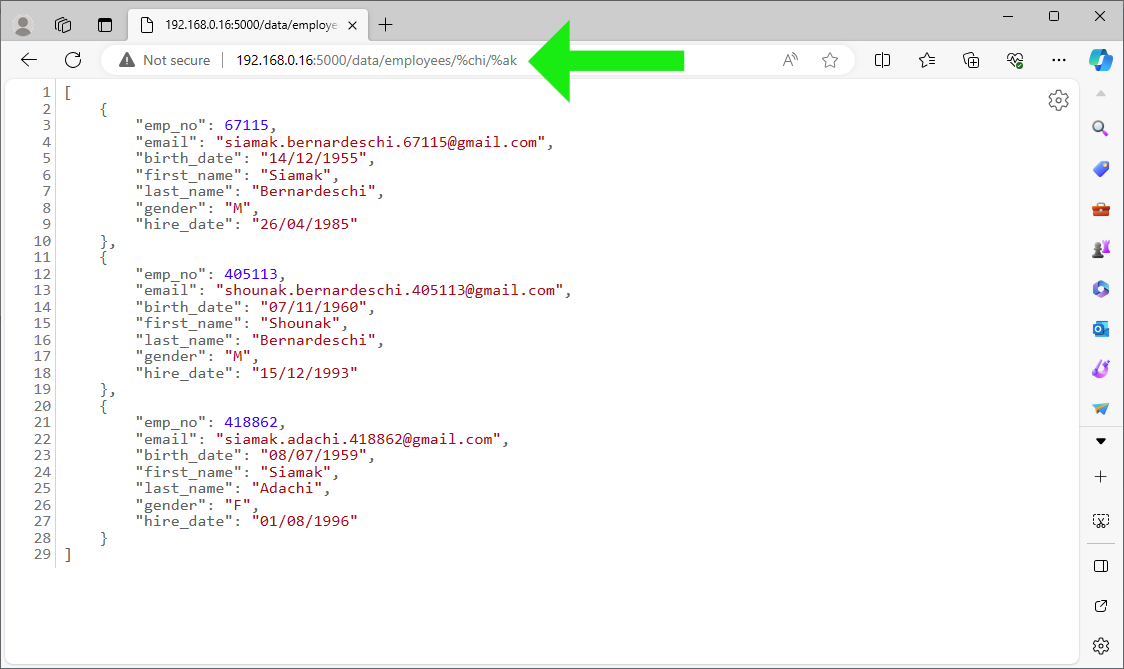
Next, enter http://192.168.0.16:5000/ui/login directly
in the browser address bar. This should bring us back to the home page.
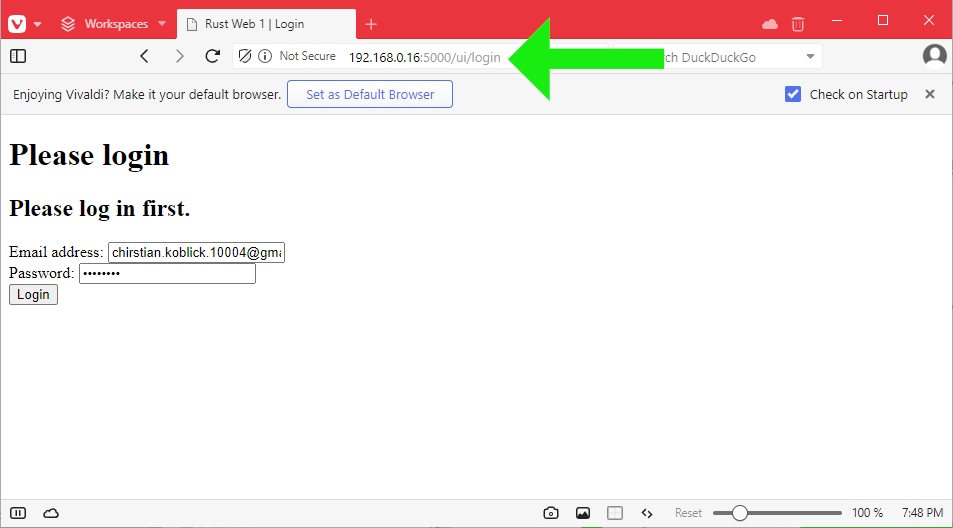
❸ While not logged in,
enter http://192.168.0.16:5000/data/employees/%chi/%ak
directly in the browser address bar. This redirects us to the login
page with an appropriate message:
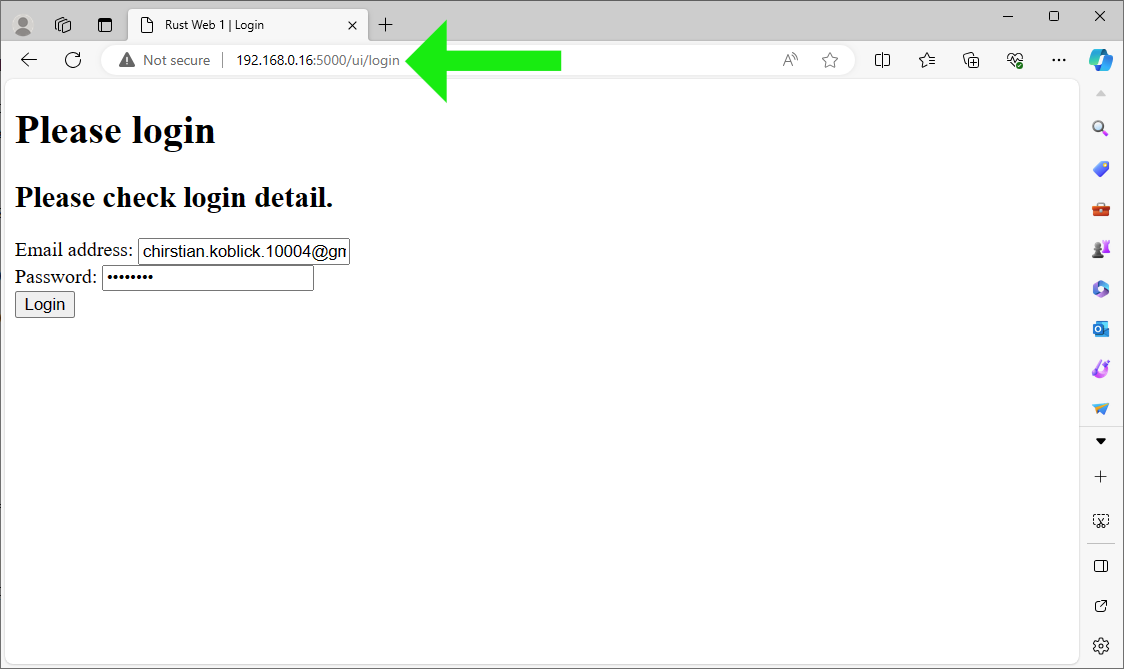
❹ Attempt to log in with an incorrect email and/or password:
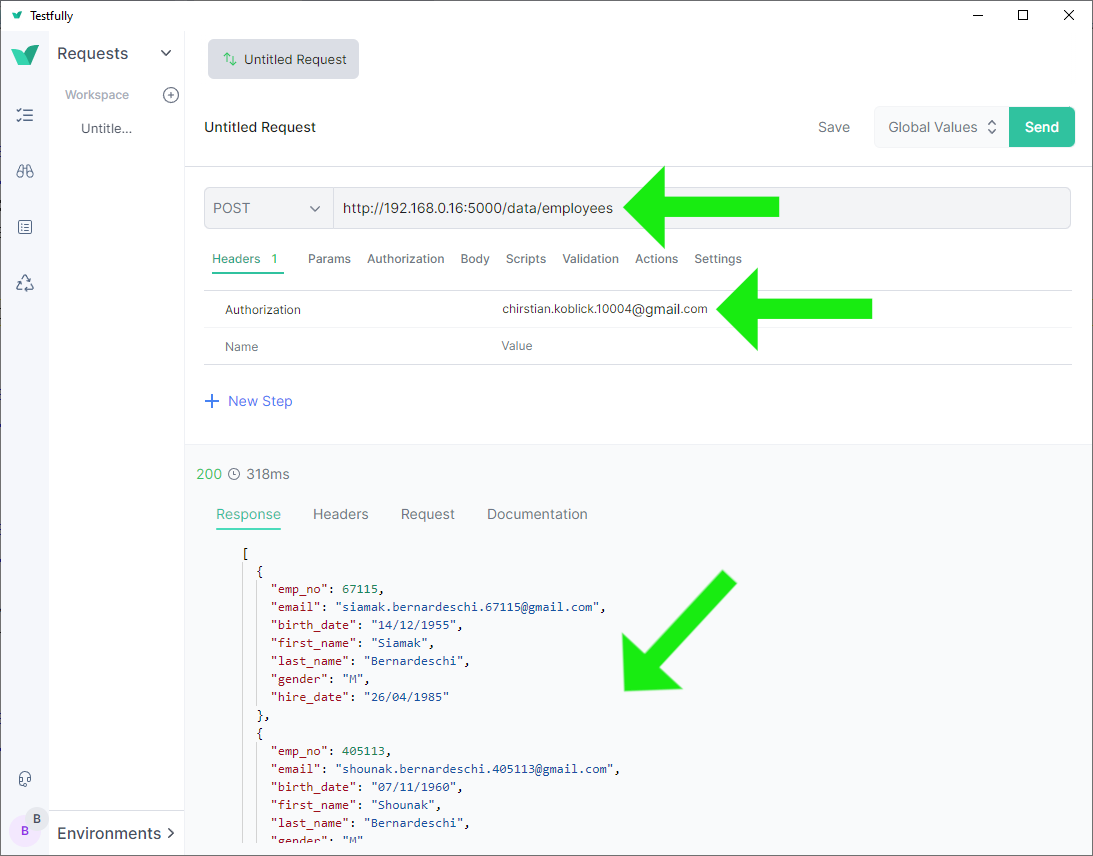
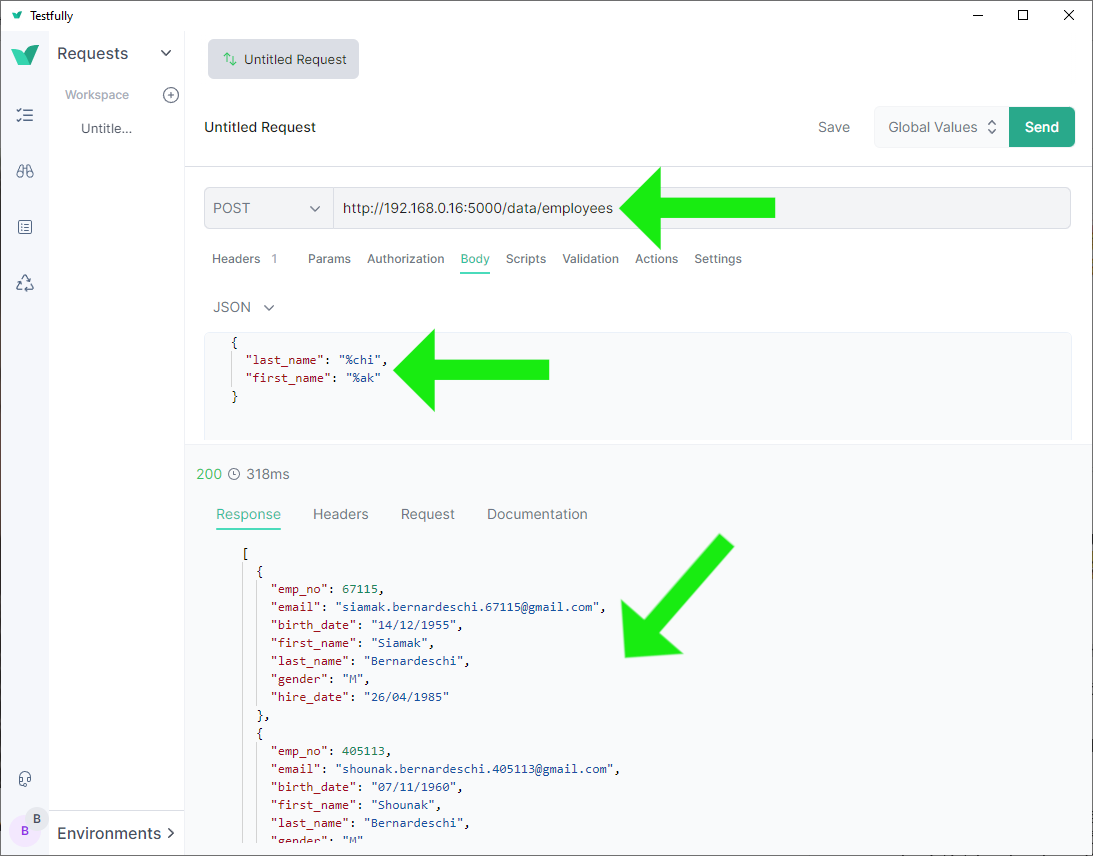
❺ Access the JSON response route http://192.168.0.16:5000/data/employees
with the authorization header. This usage demonstrate the application
as an API-like server or a
service:
❻ Access http://192.168.0.16:5000/data/employees/%chi/%ak
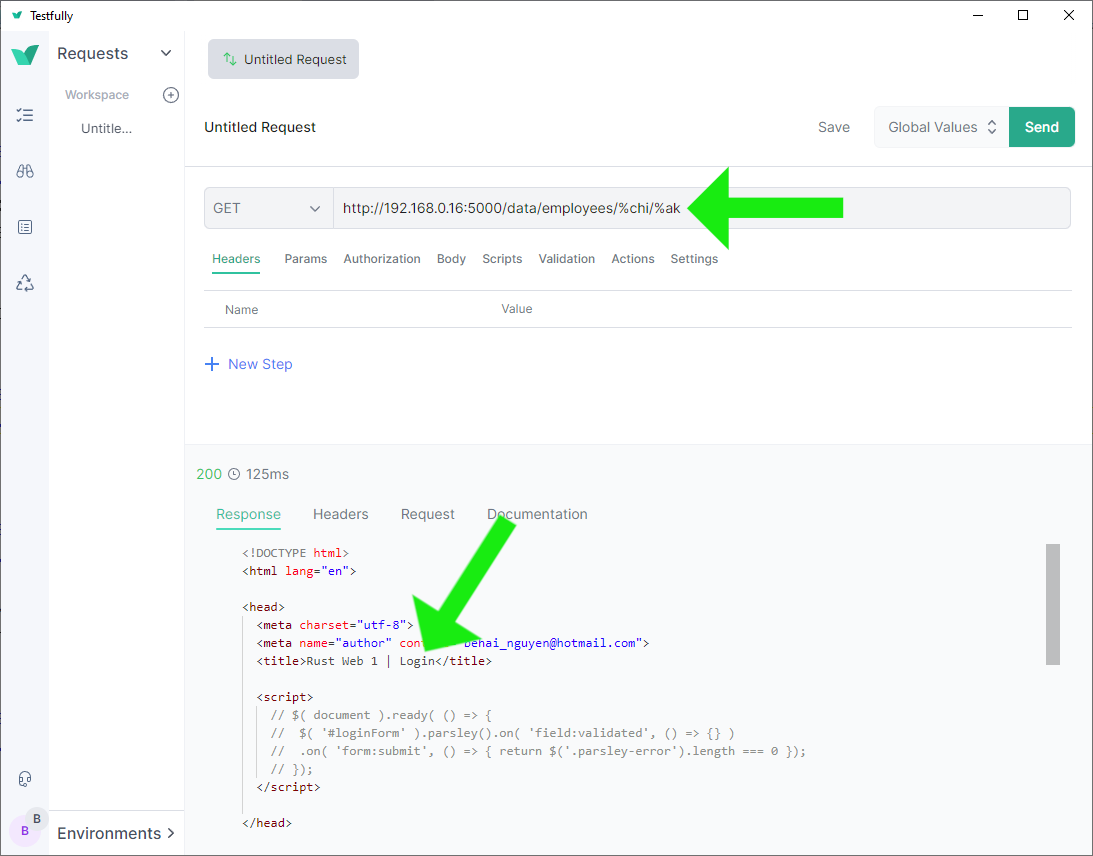
without the authorization header.
While the successful response is in JSON, the request lacks a content type.
Request authentication
fails, the response is the HTML login page
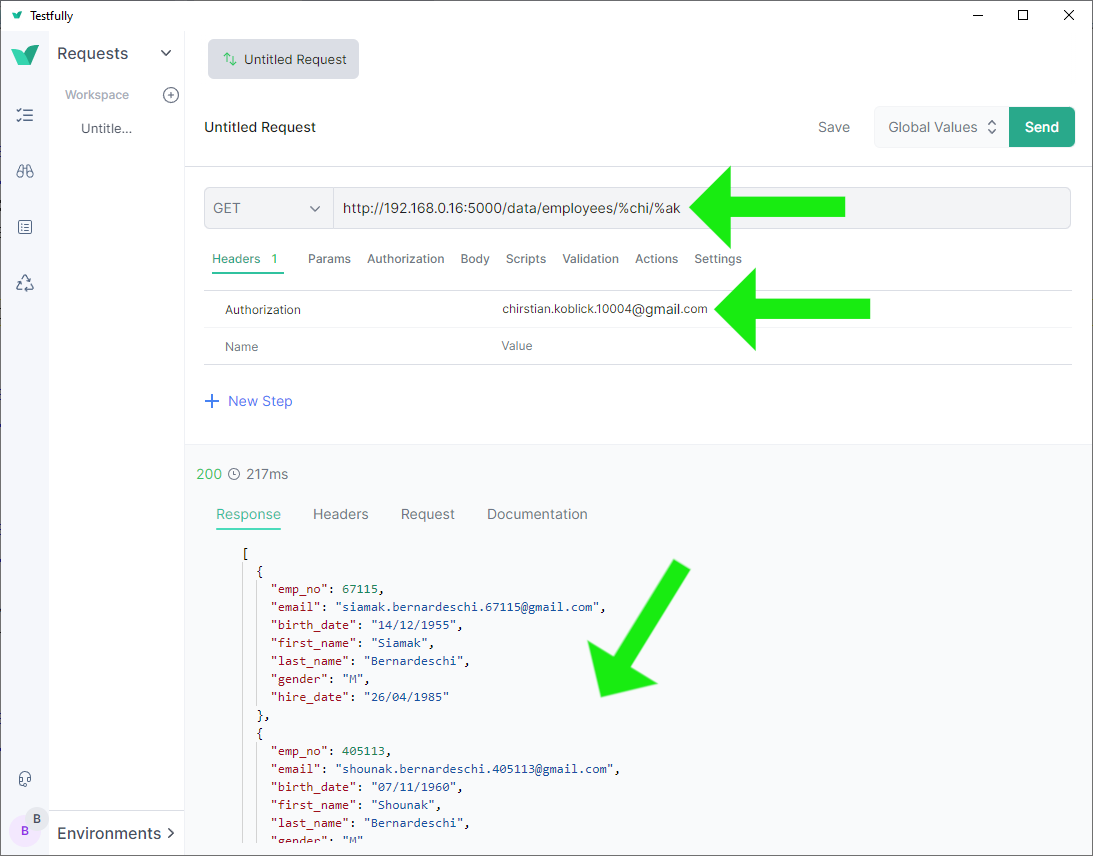
❼ Access the same http://192.168.0.16:5000/data/employees/%chi/%ak
with the authorization header. This should result in a successful
JSON response as expected:
Rust Users Forum Helps
I received a lot of help from the Rust Users Forum while learning actix-web and Rust:
- actix-web middleware redirect with extension data, please help; particularly, this reply by user jofas helped me enormously in understanding how actix-web middleware works.
-
actix-web: how to determine if a called route was a redirect?
Based on the answers provided by other users, I decided to use the
redirect-messagecookie.
Some Current Issues
❶ println! should be replaced with proper logging. I plan to implement logging to files later on.
❷ The
fn first_stage_login_error_response(request: &HttpRequest, message: &str) -> HttpResponse
helper function,
discussed in this section,
redirects requests to the route /ui/login;
whose handler is capable
of handling both application/x-www-form-urlencoded
and application/json.
And for that reason, this helper function could be refactored to:
fn first_stage_login_error_response(
    request: &HttpRequest,
    message: &str
) -> HttpResponse {
	HttpResponse::Ok()
		.status(StatusCode::SEE_OTHER)
		.append_header((header::LOCATION, "/ui/login"))
		// Note this per-request server-side only cookie.
		.cookie(build_login_redirect_cookie(&request, message))
		.finish()
}
It seems logical, but it does not work when we log in using JSON with either an invalid email or password. The client tools simply report that the request could not be completed. I haven’t been able to work out why yet.
Concluding Remarks
I do apologise that this post is a bit too long. I can’t help it. I include all the details which I think are relevant. It has taken nearly two months for me to arrive at this point in the code. It is a significant learning progress for me.
We haven’t completed this project yet. I have several other objectives in mind. While I’m unsure about the content of the next post for this project, there will be one.
Thank you for reading. I hope you find this post useful. Stay safe, as always.
✿✿✿
Feature image source:
- https://www.omgubuntu.co.uk/2022/09/ubuntu-2210-kinetic-kudu-default-wallpaper
- https://in.pinterest.com/pin/337277459600111737/
- https://www.rust-lang.org/
- https://www.pngitem.com/download/ibmJoR_rust-language-hd-png-download/